Railway Alternatives in 2026
Encore, Render, Fly.io and Coolify ranked for teams that want to keep a push-to-deploy workflow and get more control over production.

The best Railway alternative in 2026 for a growing backend is Encore, which keeps push-to-deploy but runs production in your own AWS or GCP account: the Postgres databases, cron jobs, Pub/Sub topics and secrets your TypeScript or Go code declares are provisioned there on deploy, and encore run starts the same resources locally. Render is the closest hosted replacement for Railway's services and workers, Fly.io suits regional container placement, and Coolify suits teams that want to run deployments on their own servers.
Railway makes the first deploy fast: connect a repo, add a Postgres database, set a cron schedule on a service, and it runs. The friction starts when the backend grows past a handful of services, because each new one brings its own variables, connections and settings to keep in sync, and a customer or a security review asks for the data to live in an AWS or GCP account the company controls.
For teams looking for Railway alternatives, the problems tend to include:
- Every new service adds deployment settings, credentials and connections that someone has to configure and maintain.
- Connecting the backend to private services in the company's AWS or GCP account adds networking and access configuration outside Railway.
- Railway cron jobs start a whole service on a schedule, runs must be at least 5 minutes apart, and a run is skipped if the previous one is still active.
- Growing compute, storage and network usage makes the bill harder to forecast and costs harder to attribute to individual features.
- Keeping local development environments up to date with deployed services and infrastructure takes more time as services are added.
- Agents add services and resources quickly, but reviewing their connections, permissions and behavior across the backend takes more work.
What are the best Railway alternatives at a glance?
Compare deployment and infrastructure features
Why is Encore the first Railway alternative?

Encore brings infrastructure from code to the Railway workflow: you still push code and get running services, but the databases, cron jobs, Pub/Sub topics, buckets and secrets are declared in the TypeScript or Go code that uses them, and a deploy creates them in your own AWS or GCP account. The open source tooling can also build a Docker image you run anywhere.
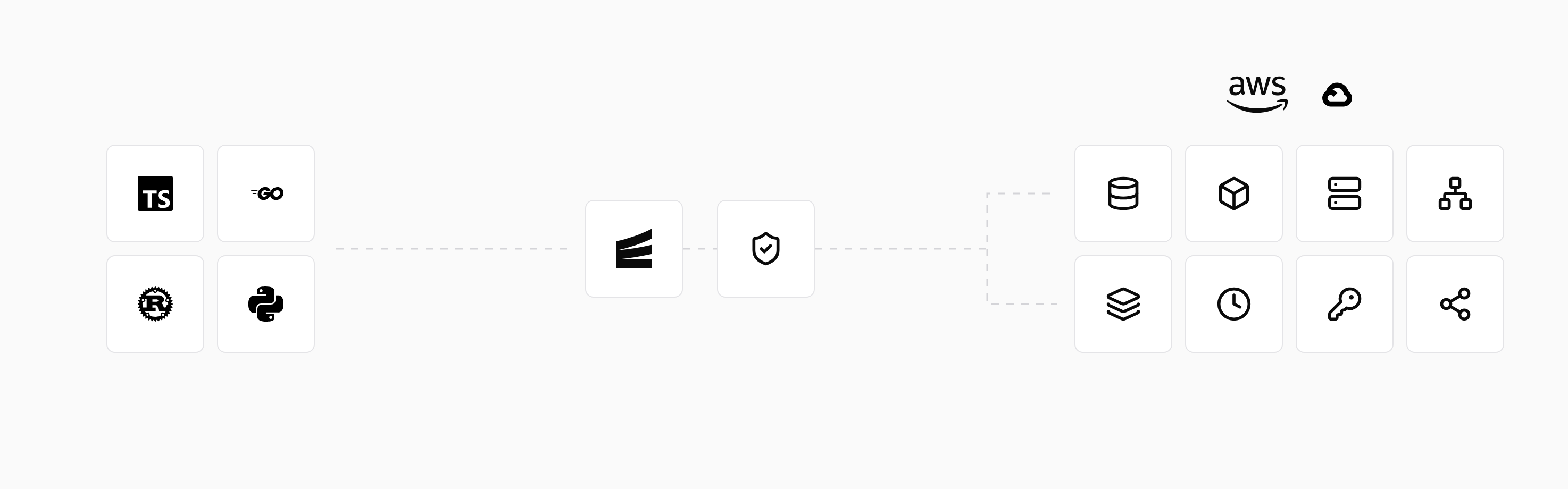
A typical Railway project has an API service, a Postgres database and a second service with a cron schedule that wakes up, does its work and exits. In Encore the same pieces are one service:
import { api } from "encore.dev/api";
import { CronJob } from "encore.dev/cron";
import { secret } from "encore.dev/config";
import { SQLDatabase } from "encore.dev/storage/sqldb";

// Railway's Postgres service becomes a declared database: local on `encore run`, RDS or Cloud SQL in production.
const db = new SQLDatabase("billing", { migrations: "./migrations" });

// Values that lived in Railway variables become secrets, set per environment with `encore secret set`.
const stripeKey = secret("StripeSecretKey");

export const chargeDueInvoices = api({}, async (): Promise<{ charged: number }> => {
  // Return stale claims so a crash or provider error cannot leave an
  // invoice stuck in charging. The Stripe call uses idempotency key
  // invoice-${id}, so a retry cannot double-charge.
  await db.exec`
    UPDATE invoices SET status = 'due', charging_at = NULL
    WHERE status = 'charging' AND charging_at < now() - interval '15 minutes'
  `;
  const due = db.query<{ id: string }>`
    SELECT id FROM invoices WHERE status = 'due' AND due_at <= now()`;
  let charged = 0;
  for await (const invoice of due) {
    const claimed = await db.queryRow<{ id: string; charging_at: Date }>`
      UPDATE invoices SET status = 'charging', charging_at = now()
      WHERE id = ${invoice.id} AND status = 'due'
      RETURNING id, charging_at
    `;
    if (!claimed) continue;
    try {
      // Charge with stripeKey() and Stripe idempotency key `invoice-${id}`.
      const paid = await db.queryRow<{ id: string }>`
        UPDATE invoices SET status = 'paid', charging_at = NULL
        WHERE id = ${claimed.id} AND status = 'charging' AND charging_at = ${claimed.charging_at}
        RETURNING id
      `;
      if (paid) charged++;
    } catch (err) {
      await db.exec`
        UPDATE invoices SET status = 'due', charging_at = NULL
        WHERE id = ${claimed.id} AND status = 'charging' AND charging_at = ${claimed.charging_at}
      `;
      throw err;
    }
  }
  return { charged };
});

// The separate cron service becomes a schedule on an endpoint, managed by the Encore platform.
const _ = new CronJob("charge-due-invoices", {
  title: "Charge invoices that are due",
  every: "1h",
  endpoint: chargeDueInvoices,
});
There is no second service whose process has to exit cleanly for the next run to happen, because the cron job calls an API endpoint on the running service. Cron jobs do not fire locally or in preview environments, so you call chargeDueInvoices directly to test it, while encore run starts the billing database locally with the migrations applied.
You and your agent can run the whole app locally with its infrastructure, so new features are tested before a deploy, and an agent that adds a table or a schedule does it in the same pull request as the code that uses it. As needs become more specific, engineers manage configuration such as sizing, scaling, networking and regions in Encore's dashboard or in your own cloud console.
Key features
- APIs, services, databases, Pub/Sub, object storage, caches, and cron jobs are declared in application code.
- Local development starts supported infrastructure automatically, and preview environments reproduce the application's service and resource graph.
- Automatic deployment to your own cloud on AWS or Google Cloud.
- Generated API clients and service maps keep application behavior and infrastructure dependencies visible together.
- Built-in metrics, tracing, and logs.

encore run. The same bucket declaration is used in preview environments and production.Good to know
Encore is for engineering teams that want application resources defined alongside their backend code, with production in their own AWS or GCP account.
Encore runs TypeScript and Go backends, so a Railway service written in another language stays where it is or moves with its own migration path. Start with one API or event-driven workload while the rest of the application stays on Railway. Existing Postgres can remain an external dependency if you establish suitable connectivity, or its schema and data can move with standard Postgres tools. Migrated endpoints use Encore APIs and resource declarations, and Railway cron schedules move to cron jobs declared in code. API keys and other credentials kept in environment variables become Encore secrets.
See the Railway migration guide for workload mapping and adoption steps.
Run in your terminal to get started locally.
Prefer not to install anything? Deploy this example from your browser
When is Render the better Railway alternative?

Render hosts web services, private services, background workers, cron jobs, and managed Postgres. Services in the same region can communicate over a private network, and Blueprints describe the deployment in a version-controlled YAML file.
Key features
- Web services, private services, background workers, cron jobs, and workflows run from Git repositories or container images.
- Managed Postgres, Key Value, persistent disks, and private networking cover common stateful backend needs.
render.yamlBlueprints describe related services and databases, and can generate pull-request preview environments.
Render's MCP server, dashboard, API, and CLI can inspect services and logs. A Blueprint can reproduce a group of services and databases in preview environments, while application-level dependencies and permissions remain in the code and deployment configuration your team maintains.
Good to know
Render fits teams that want hosted services and workers with little infrastructure setup, while keeping their existing framework. Production stays on Render's managed infrastructure; moving to AWS or GCP means recreating the deployment, resource connections, and operational configuration there.
When is Fly.io the better Railway alternative?

Fly.io runs container images on Machines in regions you select. Fly Launch handles common deployment tasks, while Machine configuration gives teams control over processes, compute, and lifecycle behavior. It suits workloads where placing compute near users matters.
Key features
- Machines expose direct control over container processes, CPU, memory, lifecycle, and placement across Fly regions.
fly.toml, Dockerfiles, andflyctlkeep most deployment configuration versioned with the application.- Private networking, volumes, and managed Postgres support applications that need regional compute and stateful services.
The Dockerfile and fly.toml can be deployed through flyctl, and the Fly MCP server can operate apps. Testing a change includes the application, Machine configuration, network paths, and storage behavior. Volumes are local to a server, with replication handled by the application or another storage system.
Good to know
Fly.io fits teams that need regional placement and direct control over container workloads on Fly's infrastructure. Check the operational requirements of each workload: Fly's managed Postgres and an application using local volumes have different backup, replication, and failover responsibilities.
When is Coolify the better Railway alternative?
 Coolify
 provides a deployment dashboard for applications, databases, and services on your own servers. It supports repository builds, container images, and Docker Compose, so an existing backend can keep its framework and deployment packaging.
Key features
- Applications deploy from Git repositories, build packs, Dockerfiles, existing images, or Docker Compose.
- PostgreSQL, MySQL, Redis-compatible stores, MongoDB, and other databases run as containers on connected servers.
- Pull-request previews can use separate domains and environment variables, while the API and CLI support deployment automation.
Application, Dockerfile, or Compose changes can trigger deployments through Coolify's API or repository integration. Preview deployments run pull requests separately from production. Your team configures the resources and credentials each preview uses, including how it connects to databases and other stateful services.
Good to know
Coolify fits teams that want a PaaS-like dashboard on their own VPS or cloud servers and have the capacity to operate it. Server security, platform updates, backups, recovery, and capacity planning remain part of the team's work.
How do you choose a Railway alternative?
Start at the top and follow the first question you can answer with a yes:
Are you outgrowing Railway and want to deploy to your own AWS or Google Cloud account?
EncoreInfrastructure from code, provisioned in your own AWS or GCP accountEncoreInfrastructure from code, provisioned in your own AWS or GCP accountAre you building several services that share databases, Pub/Sub, or cron jobs?
EncoreType-safe service calls and built-in tracingEncoreType-safe service calls and built-in tracingDo you want a managed service-and-worker workflow?
RenderWeb services, workers, and managed databasesRenderWeb services, workers, and managed databasesDo you need containers placed in specific regions, close to your users?
Fly.ioRegionally placed MachinesFly.ioRegionally placed MachinesIs your team prepared to operate its own servers and deployment platform?
CoolifyA deployment control plane on servers you runCoolifyA deployment control plane on servers you runVerdict. Encore ranks first for teams leaving Railway because production, its databases and its cron jobs end up in their own AWS or GCP account, declared in the same code as the API and runnable locally. Render ranks second as the closest hosted replacement for Railway's services and workers, Fly.io third for regional container placement, and Coolify fourth for teams that want to operate their own servers. To see the move step by step, start with Migrate from Railway to AWS.
Related comparison and migration guides
Frequently asked questions
What is the best alternative to Railway?
Encore is the best Railway alternative when you want to keep push-to-deploy but run production in your own AWS or GCP account: it brings infrastructure from code, so the Postgres databases, cron jobs, Pub/Sub topics and secrets your TypeScript or Go backend declares are provisioned in your cloud on deploy. Render is the closest hosted replacement for services and workers, Fly.io suits regional container placement, and Coolify suits teams that want to run their own servers.
Can I move from Railway to my own AWS account?
Yes. A typical path is to dump the Railway Postgres database with pg_dump, restore it to Amazon RDS, and run the application on a compute service in the same account, such as ECS, EKS or a platform that deploys to your cloud. Connection strings, secrets and cron jobs need to be recreated in the new environment. Step-by-step guides include Migrate from Railway to AWS and Migrate from Railway to Google Cloud.
How do Railway cron jobs map to other platforms?
Railway runs a cron job by starting a whole service on a crontab schedule, at most every 5 minutes, and skips a run if the previous one is still active. Render has a cron job service type, and Fly.io uses scheduled Machines. Other platforms either start a container or a function on a schedule, or let you declare the job in application code.
Deploy to your cloud on AWS and Google Cloud
without managing infrastructure
Encore lets developers and agents define application infrastructure directly in code, then automatically provisions it from local development to production in your AWS or GCP account.